Today on your dashboard
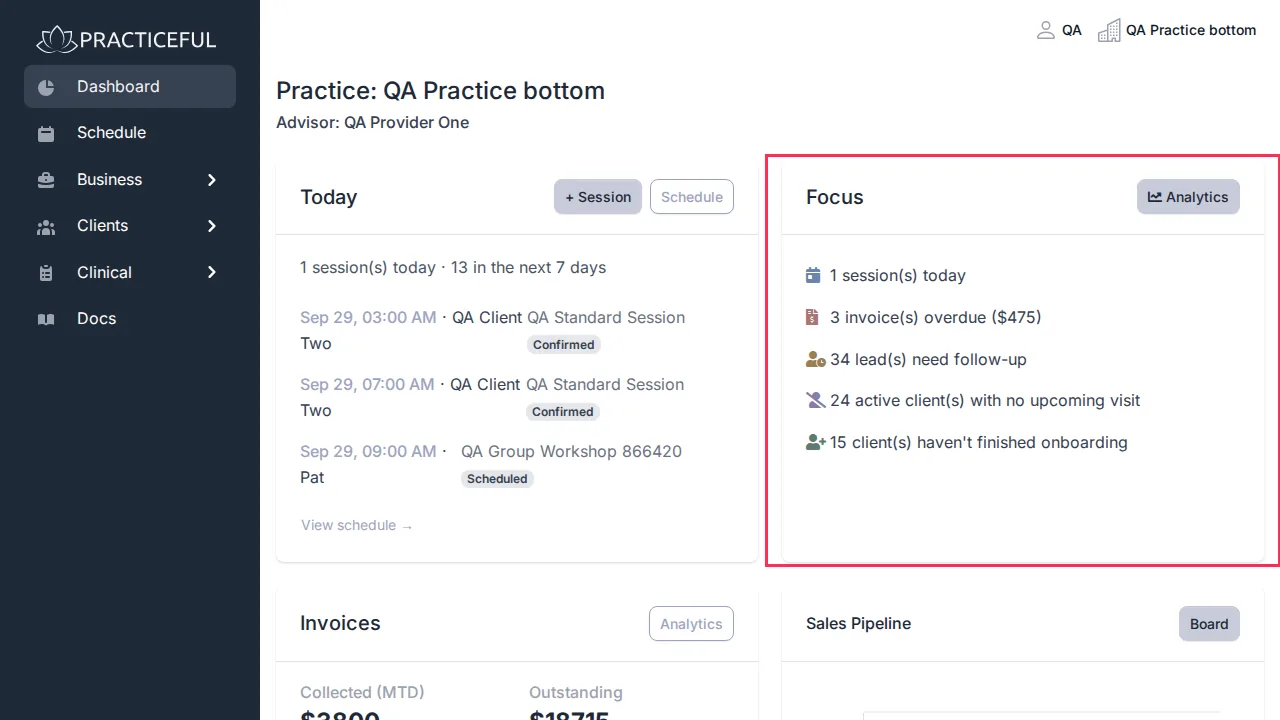
When you sign in as a provider or manager, the dashboard opens. Its Focus card is a short list of what needs your attention today. It is always on screen: there is nothing to open, nothing that folds away, and nothing to click to get it back.
Before you start
You are signed in as a provider or a manager. Clients see a different dashboard — see Your client dashboard and portal.
Read the Focus card
- Press Dashboard in the sidebar (it is also the page you land on after signing in).
-
Read the Focus card. Each line is a count, and each one stays on screen even when the count is zero:
- … session(s) today — opens the calendar.
- … invoice(s) overdue ($…) — the number and total of overdue invoices; opens billing.
- … lead(s) need follow-up — opens your leads list.
- … active client(s) with no upcoming visit — opens your client list.
- … client(s) haven't finished onboarding — shown only when some clients have not finished onboarding; opens your client list.
-
Press a line to go to the screen where you deal with it.
The Analytics button in the Focus card's header opens the practice's analytics.
If you cannot see billing or clients, the lines for overdue invoices, leads and at-risk clients read zero — Focus only counts what you are allowed to see. A manager who looks after several providers can choose whose figures to show from the Advisor menu at the top of the dashboard, or pick All.